How to Build Balloon Recipes & Pull Lists From Your Invoices
Picture your crew on prep day. The client wants a 12 foot organic garland in sage, ivory & chrome gold. Somebody opens a text thread from three weeks ago, scrolls past 47 messages & hopes the photo of your handwritten spec is the current one.
Every balloon business has some version of this. The designs you build most often live in your head, in a notebook or in a camera roll. And every time you book one, you retype the same spec for your crew.
This post covers what a balloon recipe is, why a pull list saves real time & how to get both onto your crew's work order without writing them out job after job.
What a balloon recipe is
A balloon recipe is the build spec for a design you sell regularly: which balloon sizes & types, how many of each & any notes that make it yours.
A recipe for a 6 foot garland section might look something like:
- 11" balloons: 45
- 5" balloons: 20
- 18" balloons: 3
- Note: cluster the 18s at the ends; tuck the 5s in last
That's it. It's the answer to "what do I pull & how many" for one design, written once. Colors change from job to job, so the recipe holds the structure & the palette gets picked per event.
Why recipes matter more than they seem
Consistency. When the recipe travels with the job, the garland your newest helper builds matches the one in your portfolio. Clients book the photo; recipes help you deliver the photo.
Fewer prep-day questions. Your phone stops ringing mid-prep when the spec is already on the work order.
Faster onboarding. New crew members learn your signature designs from your recipes instead of you having to stand over their shoulder each time.
Better ordering. Once your designs are written down by size & type, it's much easier to see what you go through.
Bigger designs from smaller recipes
Here's where it gets even more useful. A lot of what you sell is built from repeatable pieces. A balloon wall might be several columns together. Garland is often sold per section.
So any recipe can include other recipes you've already saved, with a quantity. A "Ceremony arch package" recipe might pull in your 6 foot garland section 4 times plus your column 2 times. The balloon counts roll up from the pieces, & the package can still have balloons of its own alongside them, like a few 24s to finish the top of the arch.
Save the pieces once & you can put together new packages without starting from zero. And when you tweak your garland section, every package that uses it picks up the change.
One tip: build packages from recipes that hold their own balloons. A package tucked inside another package won't expand on the work order, so keep it to one level.
What a pull list is (& why your crew will love it)
A recipe tells your crew how to build one design. A pull list tells them what to grab for the whole job.
If an event has a garland, two columns & six centerpieces, your crew doesn't want to add up four different specs at the inflation station. They want one list:
- 11" sage: 64
- 11" ivory: 48
- 5" dusty rose: 30
- ...and so on
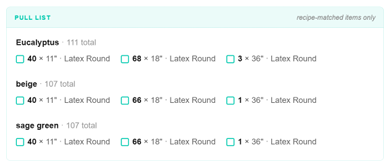
Grouped by size, so they can inflate all the 11s, then all the 5s, without jumping back & forth. (Your prep person will want the same list grouped by color, so they can pull stock one bin at a time.) That's the difference between an inflation station that flows & one that stalls every few minutes while someone does math.
How to set this up without retyping every job
You can do all of this by hand; plenty of balloon pros keep recipes in a spreadsheet or binder. The catch is still retyping: each job means copying the right specs into the right crew notes & adding up the pull list yourself.
This is what the Recipes tab in Invoice Incognito Pro is built for.
1. Save your go-to designs as recipes. Add the balloon sizes, types, quantities & notes for each design you sell often. Name each recipe exactly the way the item reads on your invoice. For bigger designs, add your saved pieces as components instead of re-entering their balloons.
2. Upload your invoice like normal. The same invoice you sent your client, from 17hats, HoneyBook, Dubsado or wherever you invoice.
3. Recipes attach to matching line items automatically. When a line item's name matches a saved recipe, the spec lands right under that item on the work order. If the wording is a little different, link it once & check "Remember this match" so it attaches on its own next time. Your crew sees the design, the colors & the sizes... everything except the price.
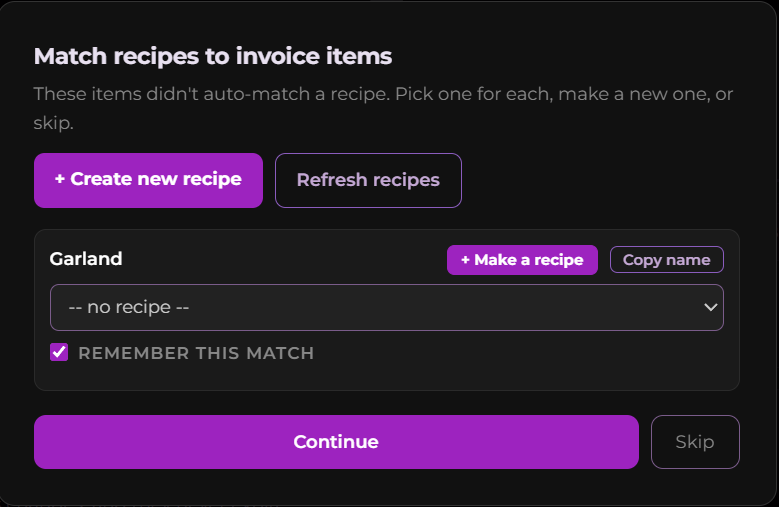
4. The pull list builds itself. Pick the colors for the job & Invoice Incognito tallies the balloons across every recipe, then organizes them by color for prep & by size for the inflation station.
And because it's still Invoice Incognito, every price, total, tax line, deposit & payment term is stripped out before the work order ever reaches your crew. If you haven't seen that part yet, How to Give Your Crew Every Job Detail Without Showing Them Your Prices walks through it.
Standard Pro accounts store up to 25 recipes. Recipe slots are separate from credits: slots are the designs you save, credits are what you use to process invoices.
Which recipes to save first
Don't try to document your whole catalog in one sitting. Start with the designs that show up on the most invoices:
- Your best-selling garland, saved per section or per foot so it scales with any length.
- Your standard column, since it shows up alone & inside bigger packages.
- Your go-to centerpiece or cluster, because it usually gets ordered in multiples.
Those three alone will cover a surprising share of your jobs. Add the rest as you book them; the next time a design shows up on an invoice, save its spec while it's fresh.
A quick recipe-writing checklist
A recipe is only as useful as it is clear. Before you save one, check that it has:
- Every balloon size in the design
- Every balloon type (round, link, heart & so on)
- Counts per unit you sell (per section, per column, per piece)
- One or two notes about technique or placement that make it look like your work
The bottom line
You already know your designs by heart. The goal is to get them out of your head & onto the page your crew works from, without rewriting them for every job.
Recipes & pull lists are part of Invoice Incognito Pro. If you haven't tried Invoice Incognito yet, start with the free version on your next single-page invoice & see the price-free work order for yourself.