How to Give Your Balloon Crew Every Job Detail Without Showing Them Your Prices
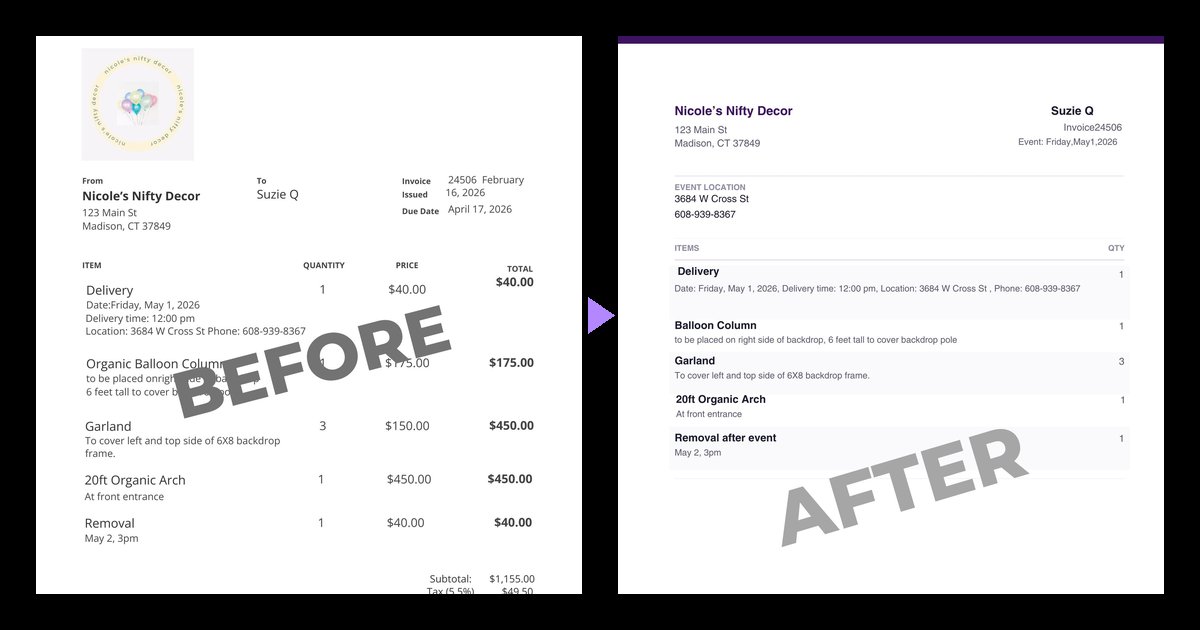
You spent real time on that invoice. The line items are clear, the placement notes are specific & the event details are all there. It's the most complete picture of the job you have, and you and your client are on the same page.
But... that invoice also has your prices on it.
So when it's time to hand the job to your production crew, you're stuck with one of three options: send the invoice anyway & hope nobody looks too closely at the totals, retype everything into a text or a separate doc, or explain it all out loud & trust it sticks. None of those options feel right for most balloon business owners.
This post walks through what your crew needs from you, what they don't & how to get from one to the other without rebuilding the job from scratch.
Why your prices shouldn't travel with the job
Most balloon & event decor pros don't hide pricing because they're secretive. They hide it because pricing on a crew document creates problems that have nothing to do with the work:
- It invites comparison. A helper who sees a $1,200 arch starts doing math about their hourly rate. That conversation rarely goes anywhere good.
- It leaves the building. Crew documents get forwarded, screenshotted & left on venue tables. Your pricing is now in places you never intended.
- It's noise. Deposits, tax lines & payment schedules take up space on a page where your crew is looking for one thing: what am I building & where does it go?
Your pricing is part of your business strategy. Your crew's paperwork should be about execution.
What a good work order includes
Think about the questions your crew asks you on build day. A solid work order answers them before they're asked.
The event basics
- Client name & invoice or job number (so everyone's talking about the same job)
- Event date
- Event location, including the address they'll put in their GPS
- An on-site or event phone number
The items, in full
This is where most retyped notes fall apart. Your crew needs the complete description for every line item, not a shortened version:
- Quantities, as plain numbers ("3", not "3 per section")
- Dimensions & sizes
- Colors
- Placement notes ("left of the stage, angled toward the entrance")
- Timing ("must be installed before the 4pm ceremony")
If it was on the invoice to describe the work, it belongs on the work order, too.
Operational policies
Load-in instructions, access requirements, "use the service elevator" notes & anything else about logistics. These keep your crew from standing in a loading dock wondering who to call.
What a good work order leaves out
Everything financial. That means:
- Prices & line totals
- Subtotals, taxes & fees
- Deposits & balances due
- Payment schedules & installment amounts
- Invoice issued & due dates
- Any policy that talks about money, like cancellation fees or late payment terms
A quick test: if a line only matters to the person paying, it doesn't belong on the crew's copy.
The retyping problem
Here's the part nobody likes to admit. Most balloon pros know exactly what a clean work order should look like. The problem is time.
Retyping an invoice into a crew-friendly format eats time on every single job, and it's the kind of task that gets rushed at 11pm the night before. Rushed retyping is where details get dropped and quantities get jumbled.
The invoice was already correct. The copy is where the mistakes creep in.
A faster way: start from the invoice you already have
This is exactly why I built Invoice Incognito. You upload the invoice you already sent your client (from 17hats, HoneyBook, Dubsado or wherever you invoice), & it hands you back a clean, price-free work order.
It keeps the job details your crew needs (item descriptions, quantities, placement notes, event date & location) and removes every dollar amount, total, tax line, deposit, payment schedule & money-related policy.
There's a free version you can try right now on a single-page PDF invoice. No account needed; just upload, enter your email & download the price-free PDF.
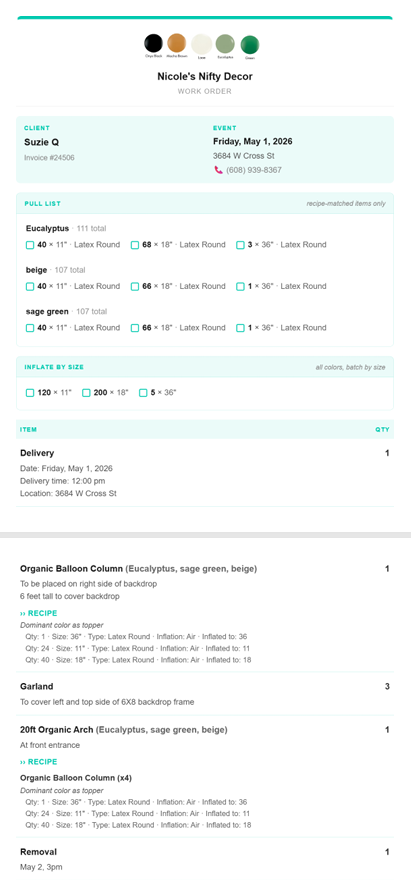
If you're doing this for more than a job or two a week, Pro adds the pieces that make it a big upgrade to your workflow:
- Multi-page invoices & image files (JPG & PNG), not just PDFs
- Your branding on every work order: your logo, your business name & your color
- Bulk upload so you can process a batch of invoices at once
- Email delivery so you can send an invoice to a special address & get the work order back in your inbox
- Recipes that auto-attach your saved balloon specs to matching line items (more on those in how balloon recipes work)
- Color pull lists so whoever's pulling inventory for the job can work faster
- Inflate by size so whoever's at the tank can do all the 11s, then all the 5s.
Pro runs on credits, not a subscription (at least for now), & credits never expire. One credit covers one invoice up to five pages!
A simple handoff routine
Whatever tool you use, a consistent handoff saves you from the late night phone calls. Here's a routine that works:
- Finalize the invoice first. Make every client change on the invoice itself, so the source of truth stays in one place.
- Make the work order from the final invoice. Not from memory & not from an older draft.
- Send it to your crew for build time. Early enough to ask questions, close enough that nothing changes.
- Keep a copy with the job. If the client calls mid-install, you & your crew are looking at the same page.
The bottom line
Your production crew doesn't need your prices to do great work. They need the full picture of the job, clearly laid out & in their hands before they load the van.
If you've been sending invoices to your crew & wincing a little, try Invoice Incognito free on your next one. Your pricing stays yours & your crew gets exactly what they need.